Best Label Makers 2026: 5 Picks for Pantries, Closets and Garages
Keyboard or phone app, 1/2-inch or 3/4-inch tape, laminated or paper: the five label makers worth buying for home organizing in 2026, and who each fits.
By The In My Home Products Editorial Team
Published · 5 min read
We may earn a commission when you buy through links on this page. As an Amazon Associate, we earn from qualifying purchases. How we make money.

The short answer
- 1For most homes, the Brother P-touch PT-D220 is the one to buy: a real QWERTY keyboard, laminated TZe labels up to 1/2 inch wide, 25 templates and a low price tier.
- 2Prefer designing on your phone? The Brother P-touch CUBE prints the same laminated tape over Bluetooth and uses your phone's fonts. For garages and storage totes, the PT-D410 prints bigger 3/4-inch labels and includes an AC adapter.
- 3Already use DYMO tape? The LabelManager 160 is a simple handheld. The LetraTag 200B is the cheapest way in, but its paper labels are for dry, light-duty jobs.
Our top picks
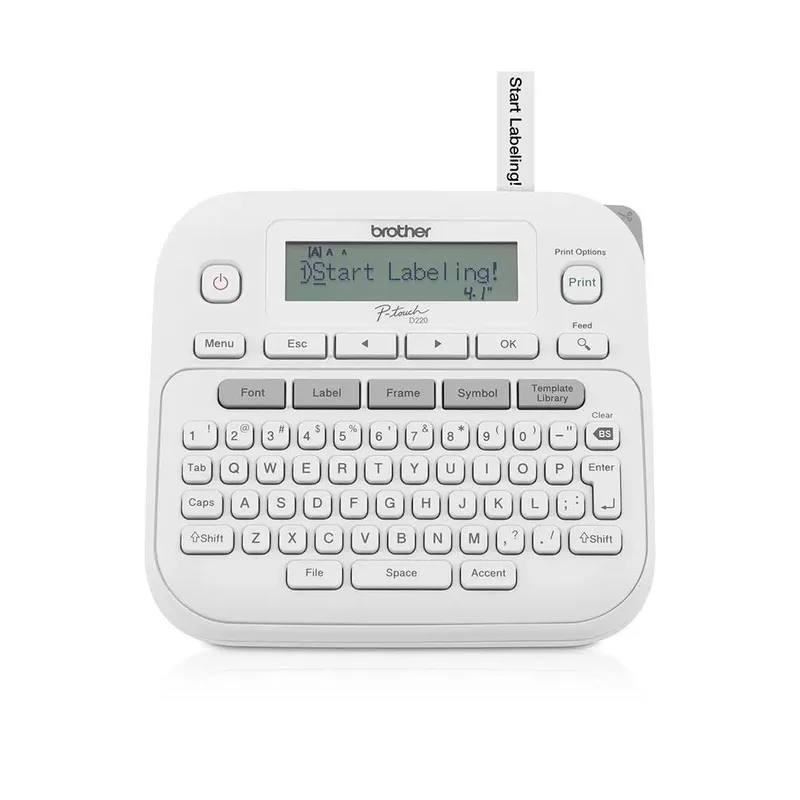
Best overall
Brother P-touch PT-D220 Home and Office Everyday Label MakerPantry, closet and office labels typed on a real keyboard
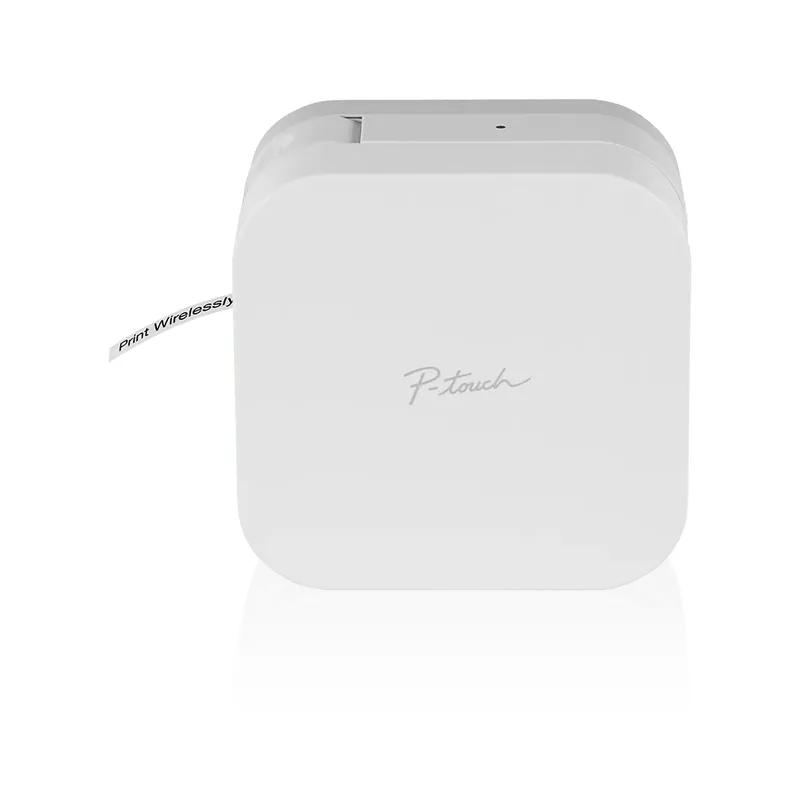
Best phone-app label maker
Brother P-touch CUBE PT-P300BT Bluetooth Label MakerDesigning labels on a phone with custom fonts and icons
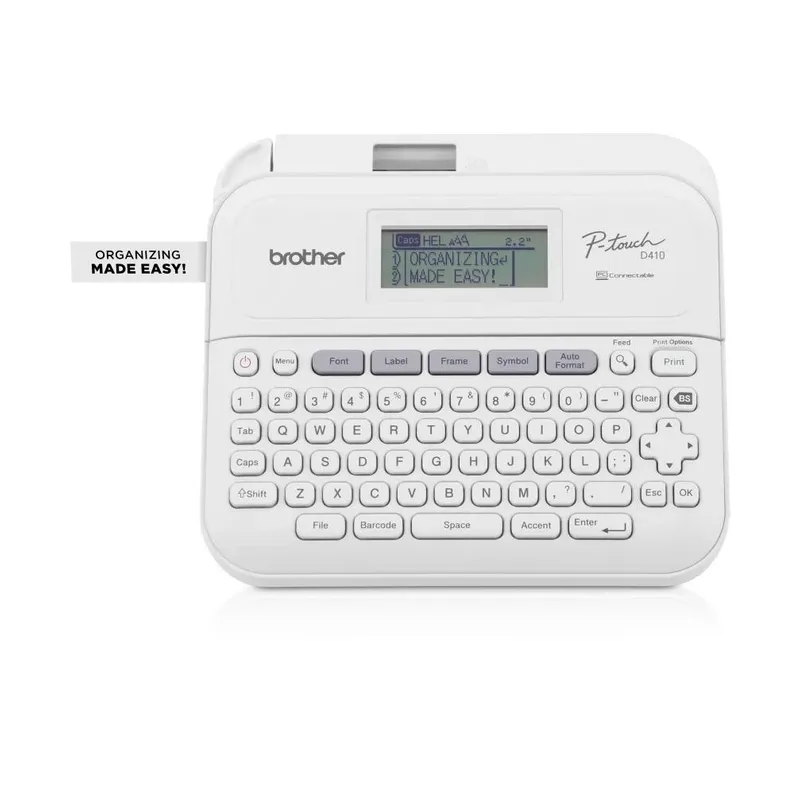
Best for garages and bins
Brother P-touch PT-D410 Home / Office Advanced Connected Label MakerBigger 3/4-inch labels you can read across a garage
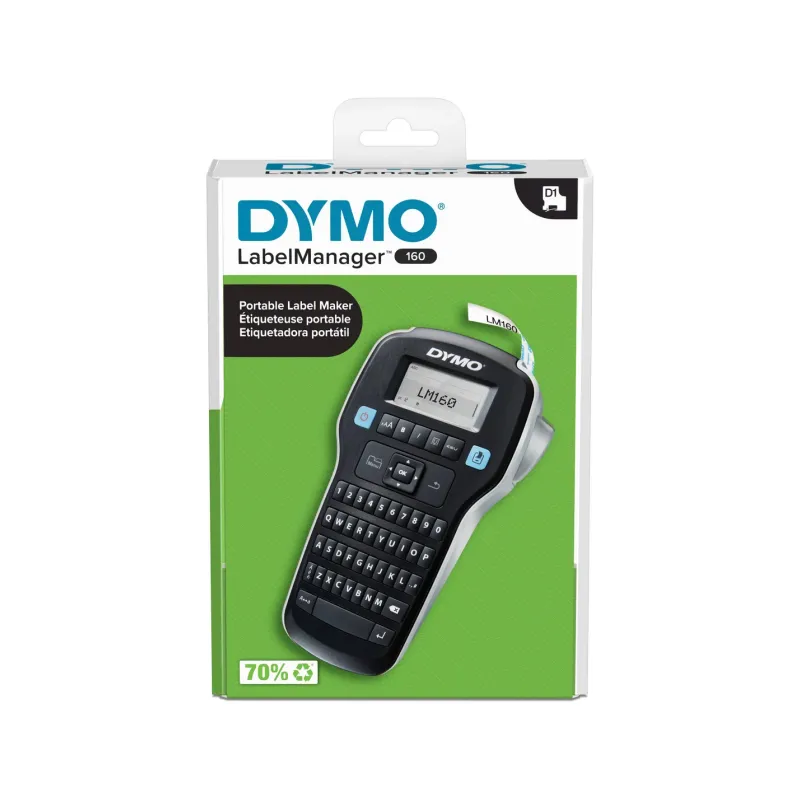
Best DYMO handheld
DYMO LabelManager 160 Portable Label MakerA simple handheld for homes that already stock D1 tape
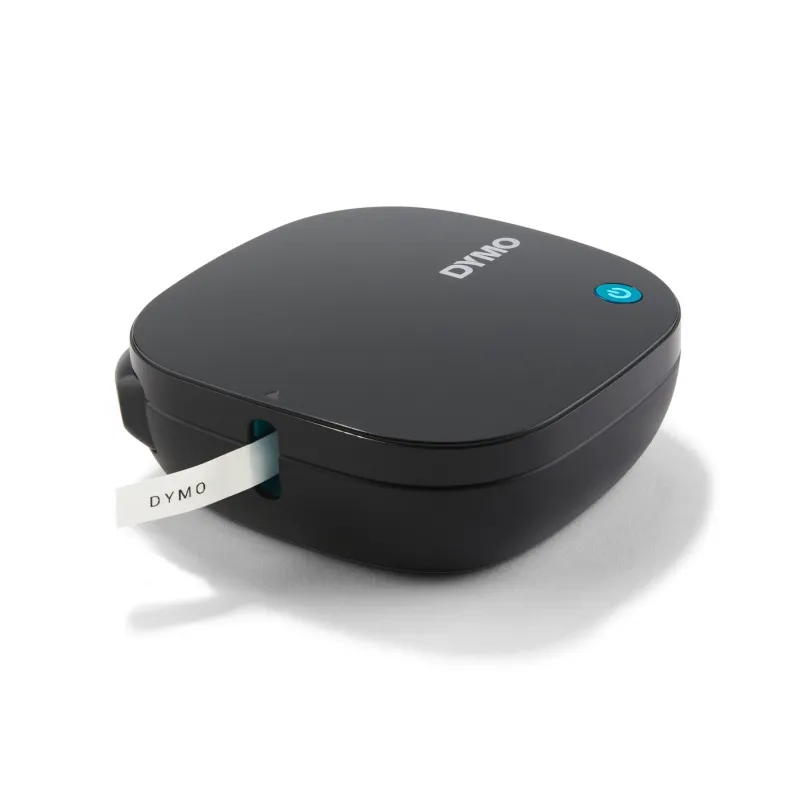
Labels are what make an organized home stay organized. Once every bin, jar and shelf says what goes there, everyone in the house puts things back in the right spot, and you stop opening three totes to find the holiday lights. (Our guide on how to store holiday decorations shows a simple labeling system.)
We compared official specs from Brother and, because dymo.com blocked automated access when we checked, DYMO's specs as published on its Target product pages. Then we analyzed long-term owner feedback. These are the five label makers worth buying for home organizing, and the job each one fits best. If you're starting with the kitchen, pair a label maker with our best pantry storage containers.
How we chose
We looked at what matters at home: how durable the labels are, how fast you can make one, whether the label width suits jars, bins and shelves, and what you get in the box. Power matters more than people expect, since some models include an adapter and others leave you buying batteries.
| Model | Brother P-touch PT-D220 | Brother P-touch CUBE | Brother P-touch PT-D410 | DYMO LabelManager 160 | DYMO LetraTag 200B |
|---|---|---|---|---|---|
| Our score | 8.9/10 | 8.5/10 | 8.8/10 | 7.9/10 | 7.3/10 |
| Price tier | $ (Budget) | $ (Budget) | $ (Budget) | $ (Budget) | $ (Budget) |
| Tape | Brother TZe tapes: 3.5, 6, 9 and 12 mm (up to about 1/2 in wide) | Brother TZe tapes up to 12 mm (about 1/2 in) wide | Brother TZe and HGe tapes: 3.5, 6, 9, 12 and 18 mm (up to about 3/4 in wide) | DYMO D1 label tapes in 1/4, 3/8 and 1/2 in (6, 9 and 12 mm) widths | DYMO LetraTag label cassettes |
| Keyboard | QWERTY with one-touch formatting keys | None: labels are designed in the app | QWERTY with one-touch formatting keys | Computer-style QWERTY with one-touch fast-formatting keys | None: labels are designed in the LetraTag Connect app |
| Connectivity | None (standalone; no app, USB or Bluetooth) | Bluetooth; free P-touch Design&Print 2 app for Apple and Android | USB to PC or Mac (P-touch Editor software); no phone app | — | Bluetooth to Apple or Android phones (LetraTag Connect app) |
| Power | 6 AAA batteries or AC adapter (neither included) | AC adapter (included) or 6 AAA batteries (not included) | AC adapter (included) or 6 AA batteries (not included) | — | 4 AA alkaline batteries (required, not included) |
| Warranty | 1-year limited | 1-year limited | 2-year limited | 1-year limited | 1-year limited |
| Best for | Most homes: pantry, closet, garage and office labels typed on a real keyboard | People who would rather design labels on a phone, with custom fonts and icons | Garages, storage bins and home offices where bigger, readable labels matter | DYMO households or anyone who wants a simple handheld label maker with easy-to-find tape | Light, occasional labeling on a budget, designed on your phone |
The best label makers, ranked
1. Best overall
Brother P-touch PT-D220 Home and Office Everyday Label Maker

Best for: Most homes: pantry, closet, garage and office labels typed on a real keyboard
Skip it if: You want to design labels on your phone or need labels wider than 1/2 inch
What owners like
- Owners frequently mention how quickly they were making labels without reading the manual
- Laminated TZe labels hold up in the fridge, freezer, garage and dishwasher-adjacent spots
- The typewriter-style keyboard is faster than thumbing labels on a phone
Watch out for
- TZe tape costs more per foot than generic tapes
- No power adapter in the box, and it goes through AAA batteries with heavy use
- Each label starts with a strip of blank tape, which wastes some tape on short labels
The PT-D220 is the label maker most homes should buy. You type on a full QWERTY keyboard, check the preview on the screen and print, with one-touch keys for fonts, frames and symbols. Brother lists 14 fonts, 99 frames, 650 symbols and 25 templates, and it prints on laminated TZe tapes from 3.5 mm up to 12 mm (about 1/2 inch), including flexible ID tape for cables and iron-on fabric tape for kids' clothes. It's compact at 6.2 by 5.9 inches. The catches: neither batteries nor an AC adapter come in the box, TZe tape costs more than generic tape, and the screen isn't backlit. Our full Brother P-touch PT-D220 review has the details.
Key specs and score breakdown
- Tape
- Brother TZe tapes: 3.5, 6, 9 and 12 mm (up to about 1/2 in wide)
- Keyboard
- QWERTY with one-touch formatting keys
- Display
- Graphic LCD, 15 characters x 1 line, print preview, no backlight
- Fonts and designs
- 14 fonts, 11 font styles, 99 frames, 650 symbols, 25 templates
- Print lines
- Up to 2
- Connectivity
- None (standalone; no app, USB or Bluetooth)
- Power
- 6 AAA batteries or AC adapter (neither included)
- Dimensions
- 6.2 x 5.9 x 2.7 in
Specs from the Brother product page, checked November 13, 2026.
- Performance (30%)
- 8.8
- Ease of use (20%)
- 9.2
- Fit for the home (20%)
- 9.0
- Build & support (15%)
- 8.4
- Value (15%)
- 9.2
2. Best phone-app label maker
Brother P-touch CUBE PT-P300BT Bluetooth Label Maker

Best for: People who would rather design labels on a phone, with custom fonts and icons
Skip it if: You want to grab it and type a label without opening an app
What owners like
- Owners like designing labels on a big phone screen with real fonts and icons
- Laminated labels look clean and last on bins and jars
- Compact enough to keep in a kitchen or craft drawer
Watch out for
- Useless without a phone or tablet nearby, which slows down quick one-off labels
- Some owners report Bluetooth pairing and app hiccups
- Costs more than keyboard models with the same tape width
The P-touch CUBE is for people who would rather design a label on a phone. There's no keyboard or screen; you build labels in Brother's free Design&Print 2 app for Apple and Android and print over Bluetooth, using fonts already on your phone. It prints the same laminated TZe tape as the D220 (up to 1/2 inch), stores 100 labels and includes an AC adapter. At 4.5 inches square, it hides in a drawer. The trade-off is speed for quick jobs: every label means unlocking your phone and opening the app, and some owners report pairing hiccups. It also sits a step above the D220 in price. Our Brother P-touch CUBE review goes deeper.
Key specs and score breakdown
- Tape
- Brother TZe tapes up to 12 mm (about 1/2 in) wide
- Keyboard
- None: labels are designed in the app
- Display
- None (uses your phone screen)
- Fonts and designs
- Uses most Google and Apple font libraries; 1,059 symbols and 146 frames per Brother's spec table
- Print lines
- Up to 2
- Connectivity
- Bluetooth; free P-touch Design&Print 2 app for Apple and Android
- Power
- AC adapter (included) or 6 AAA batteries (not included)
- Dimensions
- 4.5 x 2.4 x 4.5 in
Specs from the Brother product page, checked November 6, 2026.
- Performance (30%)
- 9.0
- Ease of use (20%)
- 8.0
- Fit for the home (20%)
- 8.6
- Build & support (15%)
- 8.4
- Value (15%)
- 8.0
3. Best for garages and bins
Brother P-touch PT-D410 Home / Office Advanced Connected Label Maker

Best for: Garages, storage bins and home offices where bigger, readable labels matter
Skip it if: You only label jars and drawers; the smaller D220 does that for less
What owners like
- Owners like the bigger 3/4-inch labels for storage totes, garage shelves and file boxes
- The included adapter means no hunting for batteries on big labeling projects
- Printing from a computer makes long lists and barcodes much faster
Watch out for
- Bigger and heavier than the D220, so less handy to carry around the house
- 18 mm tape costs more than 12 mm tape
- The computer software is a separate download and feels dated to some owners
If you're labeling storage totes, garage shelves or file boxes, the PT-D410 earns its spot. It prints labels up to 18 mm (about 3/4 inch) wide, which are much easier to read from across a garage, and its two-line screen shows more of what you're typing. It adds barcodes, up to 99 copies per job, a USB connection for designing labels on a computer, an included AC adapter and a 2-year limited warranty, the longest here. The downsides are size and running cost: it's bigger than the D220, 18 mm tape costs more, and the computer software is a separate download. Our Brother PT-D410 review goes deeper. Still choosing the totes themselves? See our best storage bins and totes or our Rubbermaid Roughneck review.
Key specs and score breakdown
- Tape
- Brother TZe and HGe tapes: 3.5, 6, 9, 12 and 18 mm (up to about 3/4 in wide)
- Keyboard
- QWERTY with one-touch formatting keys
- Display
- Graphic LCD, 15 characters x 2 lines, print preview, no backlight
- Fonts and designs
- 15 fonts, 13 font styles, 120 frames, 700 symbols, 30 templates; barcodes
- Print lines
- Up to 2
- Connectivity
- USB to PC or Mac (P-touch Editor software); no phone app
- Power
- AC adapter (included) or 6 AA batteries (not included)
- Dimensions
- 7.4 x 7.0 x 2.8 in
Specs from the Brother product page, checked November 13, 2026.
- Performance (30%)
- 9.2
- Ease of use (20%)
- 8.6
- Fit for the home (20%)
- 8.6
- Build & support (15%)
- 8.8
- Value (15%)
- 8.4
4. Best DYMO handheld
DYMO LabelManager 160 Portable Label Maker

Best for: DYMO households or anyone who wants a simple handheld label maker with easy-to-find tape
Skip it if: You already own Brother TZe tape, or you want to design labels on your phone
What owners like
- Owners like that it's simple: type, print, peel
- D1 tape is easy to find in office supply aisles
- Handheld shape is easy to carry from pantry to garage
Watch out for
- Battery life comes up often as a weak spot with regular use
- The small screen isn't backlit
- Owners note a leading margin of blank tape on each label
The LabelManager 160 is DYMO's simple handheld, and a good pick if you already have D1 tape in a drawer. It has a computer-style QWERTY keyboard, one-touch formatting keys, 200+ symbols and clip art, and it takes D1 tape in 1/4, 3/8 and 1/2 inch widths. Owners like that it's easy to carry from pantry to garage. It ranks below the Brother models because DYMO's published specs are thinner, owners frequently mention battery life as a weak spot, and the screen isn't backlit. It carries a 1-year limited warranty. Deciding between the two brands? See Brother vs DYMO label makers.
Key specs and score breakdown
- Tape
- DYMO D1 label tapes in 1/4, 3/8 and 1/2 in (6, 9 and 12 mm) widths
- Keyboard
- Computer-style QWERTY with one-touch fast-formatting keys
- Fonts and designs
- 20+ ways to format text; 200+ symbols and clip art
- Dimensions
- 10 x 6.5 x 2.5 in (as listed)
- Weight
- 1.21 lb
- Warranty
- 1-year limited
Specs from the DYMO product page, checked November 6, 2026.
- Performance (30%)
- 8.2
- Ease of use (20%)
- 8.6
- Fit for the home (20%)
- 8.4
- Build & support (15%)
- 7.8
- Value (15%)
- 8.6
5. Best budget
DYMO LetraTag 200B Bluetooth Label Maker

Best for: Light, occasional labeling on a budget, designed on your phone
Skip it if: You need labels that survive moisture, freezers or the garage
What owners like
- Owners like the low price and how fast simple labels come together in the app
- Fun icons and borders make it popular for kids' rooms and crafts
- Small enough to keep in a junk drawer
Watch out for
- The included paper labels are less durable than laminated or plastic tape
- Some owners report app connection hiccups
- No power adapter; runs on AA batteries only
The LetraTag 200B is the cheapest way to start labeling. It connects to the LetraTag Connect app over Bluetooth, with 5 font sizes, 15 box styles, 100+ icons and 8 templates, which makes it popular for kids' rooms and craft supplies. Know the limits before you buy: it ships with white paper label tape, which is less durable than laminated or plastic tape, it runs on 4 AA batteries with no adapter, and some owners report app connection hiccups. Keep it for dry, indoor jobs.
Key specs and score breakdown
- Tape
- DYMO LetraTag label cassettes
- Keyboard
- None: labels are designed in the LetraTag Connect app
- Connectivity
- Bluetooth to Apple or Android phones (LetraTag Connect app)
- Fonts and designs
- 5 font sizes, 15 box styles, 100+ icons, 8 pre-saved templates; underline, multiple lines, date
- Power
- 4 AA alkaline batteries (required, not included)
- Dimensions
- 7.5 x 7.43 x 3.87 in (as listed)
- Weight
- 0.92 lb
- Warranty
- 1-year limited
Specs from the DYMO product page, checked November 6, 2026.
- Performance (30%)
- 7.0
- Ease of use (20%)
- 7.8
- Fit for the home (20%)
- 7.2
- Build & support (15%)
- 7.2
- Value (15%)
- 8.8
How to choose a label maker
Keyboard or app?
A keyboard model like the PT-D220 or LabelManager 160 is faster for batch jobs: label 20 spice jars in a row without touching your phone. App models like the CUBE and LetraTag 200B give you more fonts and icons and a bigger design screen, but every label starts with opening the app.
Pick the tape width for the job
- 1/2 inch (12 mm): jars, pantry containers, drawers, cables. All five picks handle this, with the LetraTag using its own cassettes.
- 3/4 inch (18 mm): storage totes, garage shelves, moving boxes, anything read from a few feet away. Only the PT-D410 here. (Picking garage totes? See Sterilite Industrial vs Rubbermaid Roughneck.)
- Narrower tapes (6 to 9 mm): spice lids, small electronics, file tabs.
Laminated beats paper for kitchens and garages
Laminated labels resist moisture, grease and abrasion, which is why they're the right choice for the fridge, freezer, bathroom and garage. Paper labels are fine on dry closet shelves and files. Whatever you buy, stick with the maker's own tape for the best fit.
Count the real running cost
Tape is the ongoing expense, not the machine. Check the price of a refill cartridge in the width you'll use most before you choose. Also check power: the CUBE and PT-D410 include an AC adapter, while the PT-D220 and LetraTag need batteries you buy separately.
What we considered but didn't pick
Brother's PT-D210 was a long-time favorite, but Brother's own page now marks it discontinued; the PT-D220 replaces it. We also looked at Phomemo and other thermal label printers, but we couldn't confirm current specs and warranty terms from an official source, so they're out for now.
Keep organizing
Labels work best on a system that already makes sense. Start with our best pantry storage containers, and if you're stuck choosing between the two most popular sets, see OXO POP vs Rubbermaid Brilliance. For a step-by-step plan, read how to organize a pantry, or start with our quick fix for pantry chaos. Label makers are a classic holiday deal, so check our Black Friday home deals before you buy, and see our best budget organization gifts if you're shopping for someone else.
Looking for a gift rather than a buying guide? Our best gifts for people who love to organize pairs the PT-D410 with spice, drawer and pantry organizers.
Torn between the two Brother keyboard models? See Brother PT-D410 vs PT-D220. Considering DYMO's handheld? Read our DYMO LabelManager 160 review.
Frequently asked questions
Brother or DYMO: which label maker brand is better?
Both make reliable machines. The bigger difference is the tape. Brother's keyboard and CUBE models use laminated TZe tape, and DYMO's LabelManager line uses D1 tape. The two aren't interchangeable, so pick a system and stick with it. Our five picks lean Brother because its official spec pages are the most complete.
Do label maker labels survive the freezer and dishwasher?
Laminated tapes are the ones to use for cold, wet or greasy spots. Brother lists extra-strength, flexible ID and iron-on fabric TZe tapes for the PT-D220. Paper labels like the white tape that ships with the LetraTag 200B are best kept for dry shelves and files.
What label width should I buy for pantry containers?
For jars and pantry containers, 1/2-inch (12 mm) tape is the sweet spot: two lines of readable text without covering the container. For storage totes and garage shelves read from a few feet away, 3/4-inch (18 mm) tape on the PT-D410 is easier to see.
Do I need a label maker with an app?
Only if you like designing on your phone. App models like the Brother CUBE give you more fonts and icons, but you have to open the app for every label. Keyboard models are faster for quick jobs, like labeling a dozen spice jars in a row.
Why is there blank tape at the start of each label?
Most label makers feed a short margin before printing so the cutter doesn't slice into the text. Owners notice it on short labels. Printing several labels in one job, when the machine supports it, wastes less tape.
Keep reading

DYMO LabelManager 160 Review: A Simple Label Maker, With One Weak Spot
The DYMO LabelManager 160 is a handheld QWERTY label maker that uses D1 tape. Where it shines at home, where it falls short and who should skip it.

Are JoyJolt Airtight Glass Jars Worth It? Our 32 oz Set Review
All-glass jars with clamp lids and spare seals. Where the JoyJolt 32 oz set shines, where it falls short, and who should skip it.

Brightroom 6-Piece Clear Drawer Organizer Review: Cheap Bins That Work?
Brightroom's 6-piece clear drawer organizer is a low-cost set of mixed-size bins for desks, vanities and junk drawers. Pros, cons and who should skip it.